
Summary: Voice control allows people to operate their devices hands-free through verbal commands, described by some users as an “invisible hand.” Google Assistant or Android Voice Access, as examples, can be used for everyday tasks in the home or on mobile devices
User groups
- People who are blind
- People who have low vision
- People with mobility or motor impairments who have difficulty using a keyboard or mouse
- People with cognitive disabilities and differences
- People with different learning styles
Speech control software
Speech control software helps people control a computer by speaking commands or dictating text.
Mobile
Voice Access is an Android accessibility service that lets users control their device hands-free through voice commands that open apps, tap buttons, scroll, and type.
The iOS option is called Voice Control.
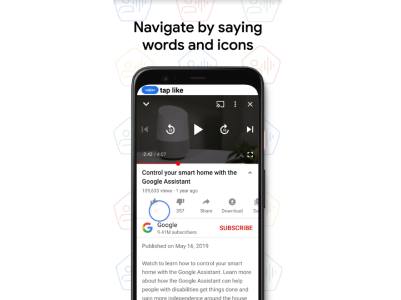 Voice Access can recognize some icons on the screen in addition to the
accessibility labels, enabling it to find the appropriate icon in a UI to take action on.
Voice Access can recognize some icons on the screen in addition to the
accessibility labels, enabling it to find the appropriate icon in a UI to take action on.
Desktop
Speech control software can be part of the operating system (Voice Control on MacOS) or separate software, such as Dragon Naturally Speaking. Dragon Naturally Speaking has been on the market for many years and established voice interaction patterns that also make it challenging for some to learn and adopt new voice patterns.
Dragon Naturally Speaking uses speech recognition to convert speech into text, which lets users navigate by using spoken commands. The navigation generally emulates keyboard and mouse interactions.
 Dragon Naturally Speaking runs on Windows and Mac.
It's available in eight languages.
Dragon Naturally Speaking runs on Windows and Mac.
It's available in eight languages.
Try it out
Head over to the Alphabet Accessibility Academy to try some simple voice access exercises on your mobile device.

Did you know
People who use Voice Access can continue to use Google Assistant with the "Ok Google" wake-up phrase, as well as, "Ok Google, Voice Access" to control their devices with voice input.

Voice control stats
Source: Voicebot.ai, go/accessibility-testing
Learn about how Paul uses Voice Access
Check out this Youtube video from Android about a man named Paul Lane who uses Voice Access in his own life, and to help others.
Watch Android presents: Paul + Voice Access
More voice access resources

Accessibility with Google Assistant
Browse through a series of videos designed to help the disability community get the most out of their Google Assistant
Voiceover and Braille screen input
Watch a YouTube video of an individual using VoiceOver and Braille screen input to compose a tweet and show navigation on their Android device
Common braille commands
Learn about using a braille display with Voiceover on your iPhone, iPad, or iPod touch and various commands that support navigation
Voice Access Google group
Join the Voice Access Google group to connect with others who use the
assistive technology.
TVCs follow the instructions at go/add-me.