
Summary: Explore additional assistive technologies that can help people with disabilities use technology more efficiently.
Explore more on the AAA
There are a number of assistive technologies not mentioned here that you can learn more about in Additional assistive technologies to explore section of the Alphabet Accessibility Academy.
Audio description
A narrator talks through video content, describing what’s happening on the screen during natural pauses in the audio. This is intended primarily for people who are blind or visually impaired. You can request audio descriptions for your video at go/get-audio-description.
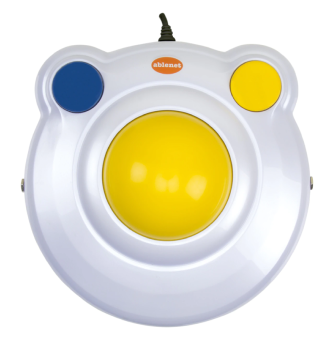
Oversized trackball mouse
A mouse that requires less gross motor movement than a cursor, which can be helpful for people with motor disabilities.
The BIGTrack 2 is an oversized trackball mouse. The larger ball makes it easier for the device to capture coarser movements that can be translated into precise movements by adjusting the cursor speed and travel of the pointer across the screen.
Head wands & mouth sticks
Assistive technologies that are comparatively low tech, such as head wands and mouth sticks, are also important to understand as not only fallbacks but also non-software tools that play a role in user experiences.
Head wands and mouth sticks are devices that fit over the head or into the mouth and extend toward a control interface. Once in place, the user can manipulate the wand or stick with their neck and jaw muscles to control an adaptive computer mouse, keyboard, mobile phone, or other assistive technology.
Mouth sticks
Mouth sticks are commonly used for typing.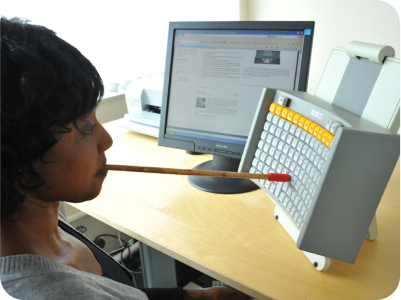
Head wands
Head wands are harder for people with limited grip strength to take off.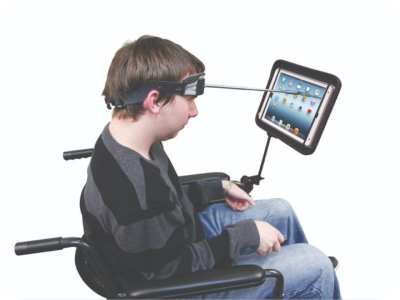
Speech-to-text (Dictation)
A tool that allows someone to speak words that are converted into typed text. Helpful for anyone, especially those with motor impairments, learning disabilities, people who are blind or low vision, or people with temporary injuries.
Haptics
Information shared by vibration and touch, commonly found in phone devices Helpful for anyone, especially people with auditory differences.
Smart pen
A pen with a camera and ability to record audio to create digitized notes.
Voice over Internet Protocol (VoIP)
Allows people to turn any device with an internet connection, like a computer or tablet, into a phone instead of using a regular (or analog) phone line. Using VoIP, speech can be translated into text on a screen
Telecommunications Relay Service (TRS)
Allows people with auditory disabilities or speech impediments to place and receive telephone calls. There are many different types of TRS that typically involve a relay in between the conversation that transform typed text into speech, interpret for an individual with a speech disability, and more.